
How Long Can an AI-Generated Video Be? Clip Limits by Model, and 4 Ways to Go Longer
 Chywe, Head of Product at HelloGen
You wrote a one-minute script, pressed Generate, and got eight seconds back. Nothing went wrong. The video models in the table below all render one short clip at a time, and a longer video is made from several of them. Three words are used the same way throughout this page: a clip is one render, a shot is the footage between two cuts, and a retake is rendering the same shot again.
✦ Paste your script into Storyboard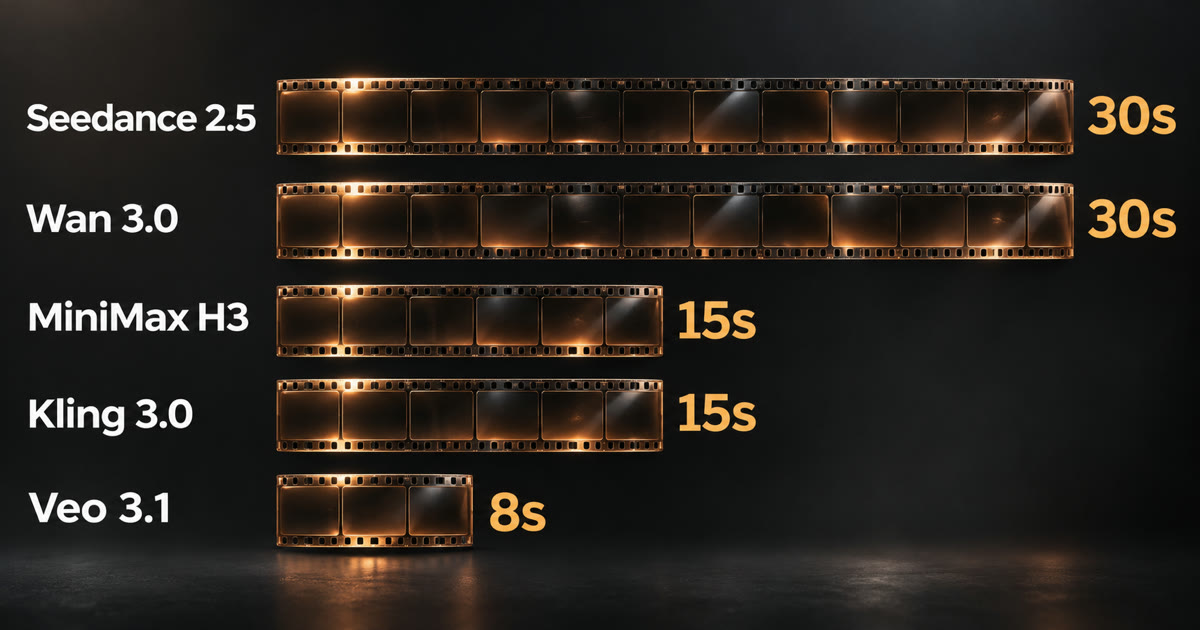
The short answer
A single AI-generated clip runs from 8 to 30 seconds, depending on the model: Seedance 2.5 and Wan 3.0 reach 30 seconds, MiniMax H3 and Kling 3.0 stop at 15, and Veo 3.1 at 8.
A longer video is several clips joined together, and the total has no fixed limit. A one-minute video is four 15-second clips; a ten-minute episode is about forty. What matters is whether the face, the room and the sound still match after every cut. The four methods below show how to make longer AI videos, including an AI video longer than 15 seconds.
How long can one AI video clip be? Limits by model
These are the lengths each vendor documents, and the lengths HelloGen’s AI video generator offers for each model.
| Model | One clip | Sound | Note |
|---|---|---|---|
| Seedance 2.5 | 4–30 s | Yes | The longest single clip, with Wan 3.0 |
| Wan 3.0 / Wan 3.0 Prime | 2–30 s | Yes | If you add a reference video, its length counts toward the 30 seconds |
| MiniMax H3 | 4–15 s | Yes | Can cut between several shots inside one clip |
| Kling 3.0 | 3–15 s | Yes | Up to six shots inside one clip |
| Seedance 2 family | 4–15 s | Yes | The same lengths as MiniMax H3 |
| Veo 3.1 | 4, 6 or 8 s | Yes | Three fixed lengths; with reference images, 8 s only |
Why are AI videos so short?
Most current video models work out the frames of a clip together, not one after another. A longer clip is more work, and it gives a face or a room more time to drift away from where it started. The limits have moved up in steps: Seedance 2 and Kling 3.0 stop at 15 seconds, and Seedance 2.5 and Wan 3.0 now reach 30.
Films are made the same way. A shot in a feature film usually lasts a few seconds, and a scene is many shots cut together. Fifteen seconds is enough for a single shot. The work is in what film crews call continuity: making the next clip look like it belongs to the last one.
Method 1: Pick a long AI video generator, up to 30 seconds per clip
This is the simplest way. For 20 to 30 seconds of unbroken footage, such as one person talking to the camera, use Seedance 2.5 or Wan 3.0. Two things to know first:
- You pay per second. A 30-second clip costs six times as much as a 5-second one. Render at 480p to check the content, then render at 720p once it is right.
- Leave shot labels out of an unbroken clip. “Shot 1” and “Cut to” are how you ask these models for cuts. For footage with no cut, write one paragraph and say “one continuous take, the camera never cuts”. Our Seedance 2.5 prompt guide has a clip made this way.
Some vendors also offer an “extend” feature that adds seconds to a finished clip. Extend features work like Method 3, so check the same rules.
Method 2: Put several shots inside one clip
Fifteen seconds does not have to be one shot. In MiniMax H3’s own prompt format the first shot opens with [Shot 1] and each later one with its cut time, [Shot 2] At 00:05.000, the shot cuts to…, so a single 15-second clip can be a three-shot scene (MiniMax’s h3-prompt-writing guide). Kling 3.0 has a multi-shot mode with up to six shots per clip. The advantage is that inside one render, the people and the room tend to stay the same.
One measurement from our own H3 tests: asked to cut at 5 and 10 seconds, H3 cut at 6.2–7.0 and 12.1–12.3 seconds. The last shot comes out shorter than you wrote it, so keep its action and any spoken line short.
Method 3: Continue from the last frame of the previous clip
When one continuous action has to run across two clips, use the last frame of the first clip as the first frame of the next. A person runs to a door in the first clip, then stops and turns back in the second. Three rules from our own test films:
| Rule | Why |
|---|---|
| Pick the sharpest of the last few frames, not the very last one | The final frame often carries motion blur, and a clip that starts on a blurred frame stays soft |
| Continue at most twice in a row, then start a new shot | A clip rendered in first-frame mode on the Seedance models takes no separate reference pictures, so a continued clip knows the person only from that one frame. Each continuation moves further from the original face |
| Use the last frame as the first frame only, never as an extra reference picture | In all five setups we tested, a clip that was given the previous ending as a reference picture acted that ending out again |
Method 4: Storyboard to video — how to make a long-form AI video of a minute or more
The most reliable way to make an AI video longer than a minute is: script → storyboard (one row per shot) → each shot rendered on its own → all shots joined. Five things make the result look like one film and not like unrelated clips:
- Make the reference pictures before any video. One picture per character and one empty picture per location, attached to every shot that does not continue from a last frame. A video model remembers nothing between two clips; the pictures are what hold a face and a room in place. Our guide to consistent characters on MiniMax H3 shows how to bind them.
- Change the shot size between neighboring shots. Two medium shots of the same person in a row look like a mistake (editors call it a jump cut). A medium shot followed by a close-up looks like a normal cut. No two renders match exactly, and a change of size hides the difference.
- Write the background people into every shot. In one of our tests the guests filled the room in the wide shot and were gone after the cut. The location picture was empty, and only the first shot’s text mentioned them.
- End every clip on a named state, and start the next clip there. For example: “ends with a hand on the door handle”. The next shot opens on exactly that and does not repeat what the last one finished.
- Set all clips to the same loudness when you join them. Each clip’s sound is generated separately. In one of our films, a street shot came out 28 dB louder than the shot before it. Add a two-frame audio fade at each join.
On HelloGen this workflow is one tool: Storyboard. Paste a script, let it write the shot list, render each row again as often as you need (on MiniMax H3 Unlimited that costs no credits), keep the best one, and join the picks with one click.
What does a 1-minute AI video cost?
One render of the full 60 seconds, on HelloGen:
| How you make it | What you render | Credits for one render |
|---|---|---|
| MiniMax H3 Unlimited — 480p on Pro, 720p on Max | Four 15-second clips | 0 |
| Seedance 2.5 at 480p | Two 30-second clips | 2,040 |
| Seedance 2.5 at 720p | Two 30-second clips | 4,500 |
Retakes are the real cost of a long AI video
The table prices one render of each shot. In our test films most shots needed two or three renders (one or two retakes) before one was right, so the real figure for a paid model is two to three times the table: about 4,000 to 6,000 credits for a minute of Seedance 2.5 at 480p, which is more than Pro’s monthly credits.
On the unlimited plan a retake costs no credits. MiniMax H3 Unlimited, included in the Pro and Max plans, is 0 credits per clip with no daily cap. At least 2 clips a day on Pro and 5 on Max are priority renders, and the rest run at standard speed.
Our advice, if you are on Pro or Max: make the whole film on H3 Unlimited, and spend the plan’s credits on the few shots that need a 30-second clip or a higher resolution on another model. For ad-length videos, the same approach is in our UGC ad prompt guide.
Sources
- BytePlus ModelArk — Dreamina Seedance 2.5 prompt guide (updated November 7, 2026) — a single video up to 30 seconds.
- Alibaba Cloud Model Studio — Wan 3.0 video generation guide (updated October 27, 2026) — 2 to 30 seconds; with a video input, input plus output is at most 30 seconds.
- Kling — Kling 3.0 15s video (July 28, 2026) — 3 to 15 seconds, up to six shots per generation.
- Google Cloud — Veo 3.1 model page — 4, 6 or 8 seconds; reference image to video is 8 seconds only.
- MiniMax-H3 h3-prompt-writing skill on GitHub — the [Shot N] syntax and cut times.
- HelloGen’s own tests — cut-time drift on H3, the last-frame rules, background people across cuts, and loudness between clips come from multi-shot test films rendered on HelloGen in October 2026.
Frequently asked
Can AI generate a 10-minute video?
Not in one pass. None of the models listed above renders more than 30 seconds at once. A 10-minute video is made shot by shot from a storyboard and joined; the total length has no fixed limit.
Which AI video generator makes the longest videos?
For a single clip, Seedance 2.5 and Wan 3.0, at 30 seconds. For a finished video, length depends on the tool around the model: a generator with a storyboard and a join step can go as long as your script.
How do I make an AI video longer than 15 seconds?
There are four ways: use a model with 30-second clips, put several shots inside one clip, continue from the last frame of the previous clip, or storyboard the video and join the shots. For anything over a minute, use a storyboard.
Will the character change between clips?
Usually not, if every shot carries the same character reference picture and the prompt does not describe the look again in different words. Without a reference picture, clips usually show a different person.
Does the sound carry across clips?
In our test films the voice held when every shot used the same voice description. Leave background music out of the clips and put one music track over the finished video; music generated clip by clip does not match from one clip to the next.
Is the unlimited plan really unlimited?
There is no cap on how many clips you render with MiniMax H3 Unlimited. A set number each day are priority renders, and the rest run at standard speed. The unlimited AI video page has the details.