
Seedance 2.5 Prompt Guide: The Official Formula, a Template and Copy-Paste Examples
 Chywe, Head of Product at HelloGen
Seedance 2.5 changed three things that a prompt has to deal with. One clip can now run 30 seconds. Sound is generated together with the picture. And the model follows timestamps, which Seedance 2.0 ignored. The rules on this page come from ByteDance’s own guide, published on BytePlus and last updated on November 7, 2026 (Dreamina Seedance 2.5 prompt guide). Where a tip is ours and not the guide’s, the text says “our tip”. If you write for MiniMax H3 instead, use our MiniMax H3 prompt guide: the two models read prompts differently.
✦ Try this template with Seedance 2.5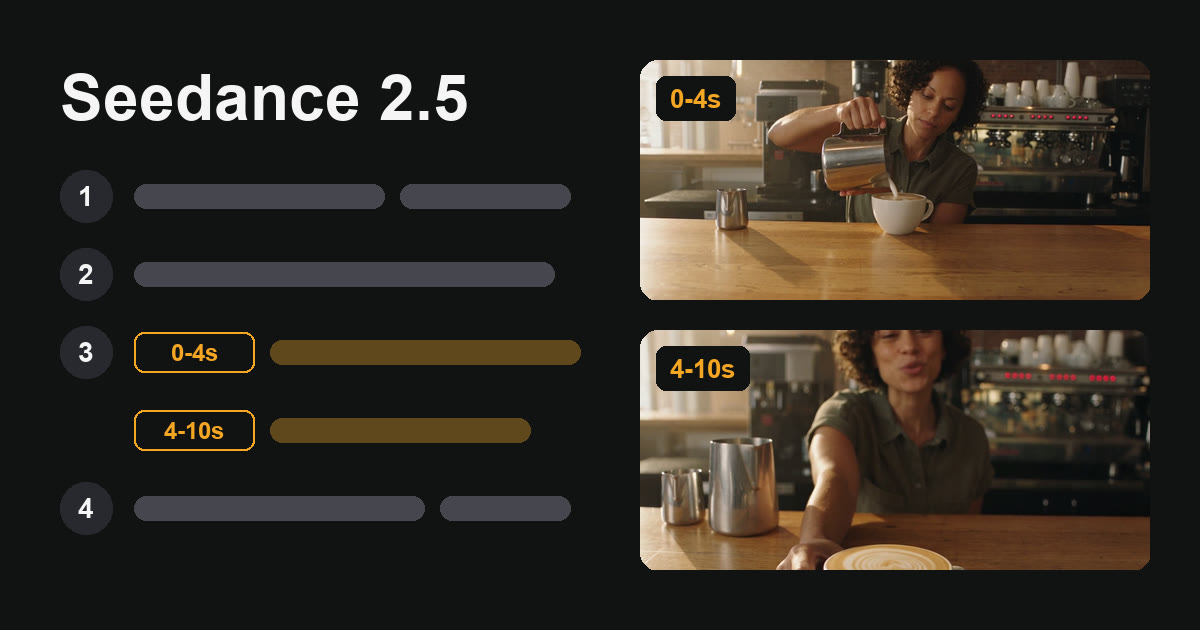
The short answer
A Seedance 2.5 prompt has four parts:
- References: which uploaded file is which (reference tasks only).
- Summary: one sentence with the subject, the place, the event and the style.
- Plot: the clip split by timestamps or by “Shot N”.
- Notes: what stays the same for the whole clip: the character, the place, the camera and the sound. The official example puts the character, place and camera notes right after the summary.
Write each spoken line as Character’s line (emotion): "words". Ask for “No subtitles” and “No BGM” in plain words. Choose the length, aspect ratio and resolution in the settings, not in the prompt.
What is the Seedance 2.5 prompt formula?
BytePlus’s guide gives one structure for every task and asks you to “write structured prompts with a visual storytelling mindset”.
| Part | What goes in it | Example |
|---|---|---|
| 1. Asset referencing | Each reference by upload order and purpose (reference tasks only) | Image 1 is the barista. Image 2 is the café; use the room only. |
| 2. One-sentence summary | Subject + location + event + genre or style | Realistic documentary style. In a small café, a barista finishes a latte and offers it to the camera. |
| 3. Detailed plot | The clip split by timestamps or “Shot N”: visuals, camera, action, dialogue, sound | 0-4 seconds: she pours the milk… 4-10 seconds: she slides the cup forward… |
| 4. Additional notes | What stays the same throughout: camera, setting, sound, mood | Handheld, chest height. Café ambience only. No BGM. No subtitles. |
Positive descriptions first, and the few negatives that work
The guide says to “use positive descriptions whenever possible”: describe what should be on screen. It documents negative instructions for two things only, subtitles (“No subtitles.”) and audio (“No BGM; generate only environmental sounds and action sounds.”). Its FAQ adds a few exclusions for specific faults, such as “no glowing eyes”; they are in the problem table further down.
A Seedance 2.5 prompt template you can copy
The numbers in brackets are parts 2 to 4; part 1 applies only when you upload references. The subject, place and camera details are notes (part 4); the official example puts them right after the summary, so this template does too. Remove the bracketed labels before you render. Line breaks are optional.
Keep the time ranges continuous. The guide warns against gaps such as “0-3s… 5-6s…”. Timestamps work in whole seconds.
[2 Summary] [Style and light]. [Where], [who] [does what].
[4 Notes] [Who they are: age, hair, clothes]. [The place: what is in it]. [The camera: shot size, height, how it moves].
[3 Plot] 0-4 seconds: [one beat of action]. [one camera move].
[3 Plot] 4-10 seconds: [the next beat]. [Character]’s line ([emotion]): "[the words]." [what they do after speaking].
[4 Notes] [Sound: ambience and effects]. No BGM. No subtitles.
Seedance 2.5 prompt example: a 10-second clip and the prompt that made it
We rendered this clip on HelloGen with Seedance 2.5 on November 14, 2026: text to video, 480p, 16:9, 10 seconds, with sound. It was one render, with no retakes, from the prompt below, sent as a single paragraph.
What the model did with it:
- One continuous clip, no cut. We asked for “one continuous take” and used no shot labels.
- The camera move happened. The framing tightens from a medium shot to a medium close-up during the pour.
- The line was spoken once, inside its time range. “This one’s on the house.” is heard between 8.3 and 9.3 seconds, in the 4–10 second range, after she slides the cup forward.
- No subtitles appear in the picture.
- One miss: we wrote “a dark green apron”, and she wears an olive-green shirt with no apron. In this render, clothing described in passing was changed; our tip is to give it its own sentence, or to use a reference image.
At 34 credits per second, this 10-second clip cost 340 credits at 480p.
Realistic documentary style, warm morning window light. In a small neighbourhood café, a barista in a dark green apron finishes a latte and offers it to the camera. The barista is a woman in her late twenties with short curly dark hair. The scene is a wooden counter with an espresso machine behind her and a window on the left. The camera is a handheld medium shot at chest height, one continuous take. 0-4 seconds: She pours steamed milk into a white cup and draws a rosetta. The camera pushes in slowly from a medium shot to a medium close-up of her hands and the cup. 4-10 seconds: She sets the jug down, slides the cup forward on the counter, looks into the lens and smiles. The barista’s line (warm, relaxed): "This one’s on the house." She keeps her hand on the cup. Natural café ambience only: milk steaming, the cup set down on wood, quiet room tone. No BGM. No subtitles.
More Seedance 2.5 prompt examples to copy
This section and the next two each give one more pattern, built on one feature from the official guide. We have not rendered these three, so treat them as starting points and change the content to yours.
Two reference images and a spoken line (reference mode). Upload the person first and the place second.
Image 1 is the presenter; keep her face, hair and clothes. Image 2 is the kitchen; use the room only, not any people in it.
Bright, clean commercial style. In the kitchen from Image 2, the presenter from Image 1 holds up a glass jar and talks to the camera.
0-3 seconds: She lifts the jar to shoulder height so the label faces the lens.
3-8 seconds: She looks into the lens. The presenter’s line (bright, friendly): "Three ingredients. That’s all."
Static medium shot at eye level, one continuous take. Kitchen ambience only. No BGM. No subtitles.
Seedance 2.5 prompt with cuts: Shot 1, Shot 2, Shot 3
Three shots with cuts (not rendered). Give each shot a number and a shot size. The guide accepts either format for the plot: “Shot sequence or timeline: either format is acceptable.”
Moody cinematic style, rainy night, neon reflections. A courier delivers a parcel to the owner of a small noodle shop, an older woman in a white apron.
Shot 1: [Wide shot, locked-off camera] A courier on a scooter stops outside a noodle shop. Rain falls through the light of the sign.
Shot 2: [Medium shot, handheld] He takes off his helmet, lifts a parcel from the box and walks to the door.
Shot 3: [Close-up] The owner opens the door and takes the parcel with both hands. The owner’s line (relieved): "You made it."
Rain and street ambience, scooter engine ticking as it cools. No BGM. No subtitles.
Seedance 2.5 prompt for a 30-second clip
A 30-second clip in five time ranges (not rendered). Our tip: one beat and one camera move per range, where a beat is one short action or a line; more than that invites extra cuts. At 480p on HelloGen a 30-second clip costs 1,020 credits.
Natural documentary style, early morning light. A potter makes a bowl in a small studio, one continuous take.
The potter is a man in his fifties with grey hair and a clay-stained apron. The studio has shelves of unfired pots and one window on the right. The camera is handheld at wheel height and moves slowly.
0-6 seconds: He drops a ball of clay onto the wheel. The camera holds a medium shot.
6-12 seconds: He presses his thumbs into the clay and the walls begin to rise. The camera pushes in to his hands.
12-18 seconds: He pulls the wall up into a bowl shape. The camera tilts up from his hands to his face.
18-24 seconds: He trims the rim with a wooden tool. The camera moves around to the window side.
24-30 seconds: He lifts the finished bowl toward the light. The potter’s line (quiet, pleased): "That will do."
Wheel hum, wet clay, quiet room tone. No BGM. No subtitles.
How do timestamps work in Seedance 2.5?
Timestamps are new in 2.5. The guide says “Seedance 2.0 does not respond to timestamps and only responds to shot numbers”, while 2.5 supports whole-second timestamps. It accepts three forms:
| Form | Example from the guide |
|---|---|
| Time ranges | “0-3 seconds… 3-7 seconds… 7-15 seconds” or “[1s-4s]… [4s-8s]…” |
| A point in time | “At the 2-second mark, a burst of golden lightning descends from the top of the frame” |
| Relative time | “John stands there blankly. After 3 seconds, everyone around him shakes their head.” |
Timestamps or Shot N: which one should I use?
Both divide the plot, and the guide accepts either. Our tip: use time ranges when the clip is one continuous take and you want to control when things happen. Use “Shot 1”, “Shot 2” with a shot size when the picture should cut. For a clip with no cut, leave shot labels out and write “one continuous take” once, as in the café example above.
How do I use reference images in a Seedance 2.5 prompt?
In reference mode, files are numbered by upload order within their kind: Image 1, Image 2, Video 1, Audio 1. The prompt has to say what each one is for. On HelloGen you type @ in the prompt box to insert a reference (it appears as @Image1), and the generator sends it in the form the model reads.
| Do this | Example from the guide |
|---|---|
| Bind every file in the text, one by one | “Image 1 depicts the protagonist John and uses the voice timbre from Audio 1.” |
| Say which part of a file you want | “Refer to Image 1 for lighting and filters.” |
| Let an accurate reference do the describing | “Strictly refer to the actions and camera movements in Video 1, and keep the sequence consistent with the video.” |
| Upload in order of first appearance | The first character on screen is Image 1 |
How many reference images can Seedance 2.5 take?
Through ByteDance’s API the model accepts up to 30 images, 10 videos and 10 audio clips, 50 files in total. The guide adds that 1 to 8 subject images “generally produce better results”. HelloGen’s generator takes up to 9 reference images plus a reference video and audio per clip, which covers that recommended range.
First frame or reference mode: which one should I use?
The two modes differ mainly in how the aspect ratio is set.
| Mode | What it does | Aspect ratio |
|---|---|---|
| First frame / first and last frame | The clip starts (and ends) on your picture exactly | Locked to the first picture; you cannot choose another |
| Reference | The clip looks like your picture but may not match it exactly | You choose it |
How do I write dialogue and sound in a Seedance 2.5 prompt?
Seedance 2.5 generates speech, sound effects and music together with the picture, in more than ten languages. Three rules from the guide:
- One line, one format. Character’s line (emotion): "words". The guide’s example is: Granny Zhou’s line (in disbelief): "像……". The emotion goes in the brackets, before the words.
- Do not repeat the words after the line. Repeating dialogue, or attaching tone and gesture notes to single words, can trigger subtitles in the picture.
- Write each line in the language it should be spoken in.
To keep music out, “No BGM” alone is sometimes not enough, because the model can render sound effects as music. The guide’s stronger version: say that only voices and ambient sound are allowed, list every word for music (“music, background music, BGM, score, instrumental, melody”), and put that sentence at both the start and the end of the prompt.
Seedance 2.5 prompt problems and fixes
All of these are from the FAQ in BytePlus’s guide.
| What you see | Why | Fix |
|---|---|---|
| Subtitles appear although you wrote “No subtitles” | Dialogue repeated after the line, or a reference video that has subtitles | Use the one-line dialogue format; use a reference video without subtitles |
| Background music although you wrote “No BGM” | Sound effects rendered as music | List the words for music and repeat the rule at the start and the end |
| Eyes glow | Strong emotion words (“fanatical”, “extremely shocked”) | Add “normal human eyes; no glowing eyes”; use calmer words such as “amazed” |
| A character gets another character’s face | Reference order does not match the order of appearance | Upload in order of first appearance and renumber |
| Misspelled text on screen | The model simplifies letter shapes | Spell the word letter by letter, or supply the text as a reference image |
| Fingerprint-like texture in grass or leaves | A reference image larger than the output | Resize the image so it does not exceed the output resolution |
| Unstable results on a complicated request | Too many requirements in one task | Split it into two simpler renders |
What changed from Seedance 2.0?
A prompt that worked on 2.0 can look different on 2.5: the guide notes that the two versions have “significantly different aesthetic style preferences”.
| Seedance 2.0 | Seedance 2.5 | |
|---|---|---|
| Longest clip | 15 s | 30 s |
| Timestamps | Not followed; shot numbers only | Whole-second timestamps |
| Multi-view character images as references | Not recommended | Supported |
| Aspect ratios | Six fixed ratios | Any ratio from 0.4 to 2.5; first-frame mode takes it from your picture, reference mode lets you choose |
Is there a Seedance 2.5 prompt generator?
ByteDance offers a prompt-optimizing skill for coding assistants, linked from its guide. On HelloGen, the ✦ Enhance button in the video prompt box rewrites a rough idea into a fuller prompt for the model you have selected. Each successful rewrite costs a few credits, and you can edit the result before you render.
When to use Seedance 2.5, and when to use MiniMax H3 Unlimited
Use Seedance 2.5 for a clip longer than 15 seconds, an ad with a spoken tagline, or a scene where the timing of each beat matters. Our tip: test at 480p first. On HelloGen, Seedance 2.5 costs 34 credits per second at 480p and 75 at 720p (November 14, 2026; see pricing).
For volume, such as testing ten openings or re-rendering a scene until the faces are right, use MiniMax H3 Unlimited. On HelloGen’s Pro and Max plans it costs 0 credits per clip with no daily cap: at least 2 clips a day on Pro and 5 on Max are priority renders, and the rest run at standard speed (unlimited AI video). Pro, from $19.90 a month, also includes 3,600 credits, which you can spend on Seedance 2.5 for the clips that need more than 15 seconds.
For videos longer than one clip, see how long an AI video can be. For product ads, see our UGC ad prompt guide.
Sources
- BytePlus ModelArk — Dreamina Seedance 2.5 prompt guide, last updated November 7, 2026 — the four-part structure, timestamps, reference mapping, first-frame and reference tasks, dialogue format, negative control, the FAQ and the differences from 2.0. Every quotation on this page is from it. The guide changes; we re-check this page when it does.
- HelloGen’s own render — the café clip: Seedance 2.5, text to video, 480p, 10 seconds, one render, made in HelloGen’s AI video generator on November 14, 2026 with the prompt shown.
- HelloGen’s generator settings and prices — clip length 4 to 30 seconds, 480p and 720p, up to 9 reference images, a 30,000-character prompt box, and credits per second, as offered on November 14, 2026.
Frequently asked
What is the prompt character limit for Seedance 2.5?
HelloGen’s Seedance 2.5 prompt box accepts up to 30,000 characters; other platforms set their own limit. Long prompts are normal for this model, but each time range should still hold one beat.
Should I write Seedance 2.5 prompts in English or Chinese?
Both work. The model generates natively in more than ten languages, and the official guide’s own examples are English prompts with spoken lines in Chinese and Japanese. Write the description in one language and each spoken line in the language you want to hear.
How long can a Seedance 2.5 video be?
From 4 to 30 seconds per clip. For longer videos, render the shots separately and join them.
Is Seedance 2.5 free?
No. It is billed per second of video. On HelloGen it is paid with credits, and the Pro and Max plans include credits every month; the pricing page lists the current rates.
Can Seedance 2.5 make a one-take video with no cuts?
Yes. Leave out “Shot” labels, describe the action as one flow, and write “one continuous take” in the camera sentence. The café clip on this page was made that way and has no cut.
Why does my Seedance 2.5 video have subtitles?
The two causes the official guide names are dialogue repeated after the line and a reference video that already has subtitles. Write each line once as Character’s line (emotion): "words", add “No subtitles”, and use a reference video without subtitles.