
Seedance 2.5 提示词指南:官方公式、模板和可以直接复制的示例
 Chywe,HelloGen 产品负责人
Seedance 2.5 有三处变化,写提示词时都得考虑进去:单条视频最长到了 30 秒;声音和画面一起生成;模型会按时间戳执行,而 Seedance 2.0 不理会时间戳。 本文的规则出自 ByteDance 自己的指南,发布在 BytePlus 上,最近一次更新是 2026 年 11 月 7 日(Dreamina Seedance 2.5 prompt guide)。凡是我们自己的建议、不是官方指南里的,文中都会标明「我们的建议」。如果你是给 MiniMax H3 写提示词,请看我们的 MiniMax H3 提示词指南:两个模型读提示词的方式不一样。
✦ 用 Seedance 2.5 试试这个模板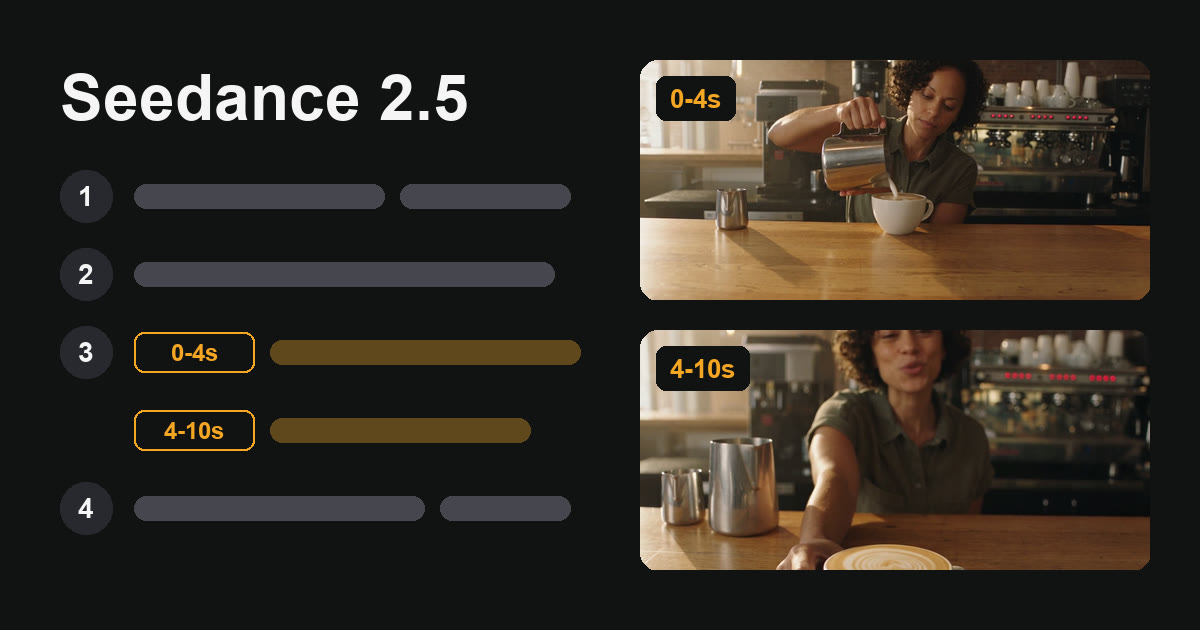
先说结论
Seedance 2.5 的提示词分四个部分:
- 素材引用:上传的每个文件各是什么(只有参考类任务需要)。
- 一句话概述:用一句话写清主体、地点、事件和风格。
- 情节:按时间戳或 “Shot N”(镜头 N)把视频分段。
- 补充说明:整条视频里不变的东西:角色、场景、镜头和声音。官方示例把角色、场景和镜头的说明直接放在概述后面。
每句台词写成 Character’s line (emotion): "words"(意思是「角色的台词(情绪):"台词内容"」)。不要字幕、不要配乐,就直接写 “No subtitles”(不要字幕)和 “No BGM”(不要背景音乐)。时长、画面比例和分辨率在设置里选,不写进提示词。
Seedance 2.5 的提示词公式是什么?
不管什么任务,BytePlus 的指南用的都是同一个结构,并要求 “write structured prompts with a visual storytelling mindset”(用视觉叙事的思路写结构化的提示词)。
| 部分 | 写什么 | 示例 |
|---|---|---|
| 1. 素材引用(Asset referencing) | 按上传顺序说明每个参考素材的用途(只有参考类任务需要) | Image 1 is the barista. Image 2 is the café; use the room only. |
| 2. 一句话概述(One-sentence summary) | 主体 + 地点 + 事件 + 类型或风格 | Realistic documentary style. In a small café, a barista finishes a latte and offers it to the camera. |
| 3. 详细情节(Detailed plot) | 按时间戳或 “Shot N” 分段:画面、镜头、动作、台词、声音 | 0-4 seconds: she pours the milk… 4-10 seconds: she slides the cup forward… |
| 4. 补充说明(Additional notes) | 全程不变的东西:镜头、场景、声音、氛围 | Handheld, chest height. Café ambience only. No BGM. No subtitles. |
先写要什么,再加少数几条管用的「不要」
指南说 “use positive descriptions whenever possible”(尽量用正面描述):写画面里应该出现什么。它明确写到的否定指令只针对两样东西:字幕(“No subtitles.”)和音频(“No BGM; generate only environmental sounds and action sounds.”,意思是不要背景音乐,只生成环境音和动作音)。指南的 FAQ 还针对具体毛病补了几条排除写法,比如 “no glowing eyes”(眼睛不要发光),都收在下文的问题对照表里。
可以直接复制的 Seedance 2.5 提示词模板
方括号里的数字对应第 2 到第 4 部分;第 1 部分只在上传参考素材时才用。主体、场景和镜头的细节属于补充说明(第 4 部分),官方示例把它们直接放在概述后面,这个模板也照这样排。生成前把带方括号的标签删掉。换不换行都可以。
时间段要首尾相接。指南提醒不要留空档,比如 “0-3s… 5-6s…”。时间戳以整秒为单位。
[2 Summary] [Style and light]. [Where], [who] [does what].
[4 Notes] [Who they are: age, hair, clothes]. [The place: what is in it]. [The camera: shot size, height, how it moves].
[3 Plot] 0-4 seconds: [one beat of action]. [one camera move].
[3 Plot] 4-10 seconds: [the next beat]. [Character]’s line ([emotion]): "[the words]." [what they do after speaking].
[4 Notes] [Sound: ambience and effects]. No BGM. No subtitles.
Seedance 2.5 提示词示例:一条 10 秒视频和它用的提示词
这条视频是我们 2026 年 11 月 14 日在 HelloGen 上用 Seedance 2.5 生成的:文生视频,480p,16:9,10 秒,带声音。只生成了一次,没有重拍,用的就是下面这段提示词,整段作为一个段落发出去。
模型是怎么执行的:
- 一条连续的视频,没有切镜头。我们写了 “one continuous take”(一镜到底),没有用镜头标签。
- 运镜做到了。倒奶的过程中,画面从中景收到中近景。
- 台词只说了一遍,而且落在它的时间段里。“This one’s on the house.”(这杯我请。)出现在 8.3 到 9.3 秒之间,在 4–10 秒这一段里,也在她把杯子往前推之后。
- 画面里没有出现字幕。
- 有一处没做到:我们写的是 “a dark green apron”(深绿色围裙),她穿的却是橄榄绿衬衫,没有围裙。这次生成里,模型没有照做顺带提到的服装;我们的建议是给服装单独写一句,或者用参考图。
按每秒 34 积分算,这条 10 秒的 480p 视频花了 340 积分。
Realistic documentary style, warm morning window light. In a small neighbourhood café, a barista in a dark green apron finishes a latte and offers it to the camera. The barista is a woman in her late twenties with short curly dark hair. The scene is a wooden counter with an espresso machine behind her and a window on the left. The camera is a handheld medium shot at chest height, one continuous take. 0-4 seconds: She pours steamed milk into a white cup and draws a rosetta. The camera pushes in slowly from a medium shot to a medium close-up of her hands and the cup. 4-10 seconds: She sets the jug down, slides the cup forward on the counter, looks into the lens and smiles. The barista’s line (warm, relaxed): "This one’s on the house." She keeps her hand on the cup. Natural café ambience only: milk steaming, the cup set down on wood, quiet room tone. No BGM. No subtitles.
更多可以复制的 Seedance 2.5 提示词示例
这一节和后面两节各给一种写法,每种对应官方指南里的一项功能。这三条我们没有实际生成过,请当作起点,把内容换成你自己的。
两张参考图加一句台词(全能参考模式)。先上传人物,再上传场景。
Image 1 is the presenter; keep her face, hair and clothes. Image 2 is the kitchen; use the room only, not any people in it.
Bright, clean commercial style. In the kitchen from Image 2, the presenter from Image 1 holds up a glass jar and talks to the camera.
0-3 seconds: She lifts the jar to shoulder height so the label faces the lens.
3-8 seconds: She looks into the lens. The presenter’s line (bright, friendly): "Three ingredients. That’s all."
Static medium shot at eye level, one continuous take. Kitchen ambience only. No BGM. No subtitles.
带切镜头的 Seedance 2.5 提示词:Shot 1、Shot 2、Shot 3
三个镜头,中间切换(未实际生成)。给每个镜头编号,并写明景别。情节用哪种格式分段,指南都接受:“Shot sequence or timeline: either format is acceptable.”(按镜头序号或按时间线,两种格式都可以。)
Moody cinematic style, rainy night, neon reflections. A courier delivers a parcel to the owner of a small noodle shop, an older woman in a white apron.
Shot 1: [Wide shot, locked-off camera] A courier on a scooter stops outside a noodle shop. Rain falls through the light of the sign.
Shot 2: [Medium shot, handheld] He takes off his helmet, lifts a parcel from the box and walks to the door.
Shot 3: [Close-up] The owner opens the door and takes the parcel with both hands. The owner’s line (relieved): "You made it."
Rain and street ambience, scooter engine ticking as it cools. No BGM. No subtitles.
30 秒视频的 Seedance 2.5 提示词
一条 30 秒的视频,分成五个时间段(未实际生成)。我们的建议:每个时间段只写一个节拍和一个运镜,一个节拍就是一个短动作或一句台词;写多了容易多出镜头切换。在 HelloGen 上,480p 的 30 秒视频要 1,020 积分。
Natural documentary style, early morning light. A potter makes a bowl in a small studio, one continuous take.
The potter is a man in his fifties with grey hair and a clay-stained apron. The studio has shelves of unfired pots and one window on the right. The camera is handheld at wheel height and moves slowly.
0-6 seconds: He drops a ball of clay onto the wheel. The camera holds a medium shot.
6-12 seconds: He presses his thumbs into the clay and the walls begin to rise. The camera pushes in to his hands.
12-18 seconds: He pulls the wall up into a bowl shape. The camera tilts up from his hands to his face.
18-24 seconds: He trims the rim with a wooden tool. The camera moves around to the window side.
24-30 seconds: He lifts the finished bowl toward the light. The potter’s line (quiet, pleased): "That will do."
Wheel hum, wet clay, quiet room tone. No BGM. No subtitles.
Seedance 2.5 的时间戳怎么用?
时间戳是 2.5 新加的。指南写道 “Seedance 2.0 does not respond to timestamps and only responds to shot numbers”(Seedance 2.0 不响应时间戳,只响应镜头编号),2.5 则支持整秒的时间戳。2.5 接受三种写法:
| 写法 | 指南里的例子 |
|---|---|
| 时间段 | “0-3 seconds… 3-7 seconds… 7-15 seconds” 或 “[1s-4s]… [4s-8s]…” |
| 时间点 | “At the 2-second mark, a burst of golden lightning descends from the top of the frame”(在第 2 秒,一道金色闪电从画面上方落下) |
| 相对时间 | “John stands there blankly. After 3 seconds, everyone around him shakes their head.”(John 愣在原地。3 秒后,周围的人都摇了摇头。) |
时间戳还是 Shot N,该用哪个?
两种都是给情节分段,指南都接受。我们的建议:视频一镜到底,又想控制每件事发生的时间,就用时间段;画面需要切镜头,就用 “Shot 1”、“Shot 2” 加景别。不切镜头的视频别写镜头标签,写一次 “one continuous take” 就够了,上面咖啡馆的例子就是这么写的。
Seedance 2.5 提示词里怎么用参考图?
在全能参考模式下,文件按上传顺序在各自的类别里编号:Image 1、Image 2、Video 1、Audio 1。每个文件是干什么用的,提示词里必须写明。在 HelloGen 的提示词框里输入 @,就能插入一个参考素材(显示为 @Image1),生成器会把它转成模型能读的写法再发出去。
| 做法 | 指南里的例子 |
|---|---|
| 在提示词里逐个写明每个文件对应什么 | “Image 1 depicts the protagonist John and uses the voice timbre from Audio 1.”(Image 1 是主角 John,音色用 Audio 1 的。) |
| 说明要用文件的哪一部分 | “Refer to Image 1 for lighting and filters.”(光线和滤镜参照 Image 1。) |
| 参考素材够准确时,让它替你描述 | “Strictly refer to the actions and camera movements in Video 1, and keep the sequence consistent with the video.”(动作和运镜严格参照 Video 1,顺序与视频保持一致。) |
| 按出场顺序上传 | 第一个出场的角色是 Image 1 |
Seedance 2.5 最多能用几张参考图?
通过 ByteDance 的 API,模型最多接受 30 张图片、10 段视频和 10 段音频,合计 50 个文件。指南补充说,主体图片用 1 到 8 张 “generally produce better results”(效果通常更好)。HelloGen 的生成器每条视频最多可用 9 张参考图,外加一段参考视频和一段参考音频,覆盖了这个推荐范围。
首帧还是全能参考,该用哪个模式?
两种模式的主要区别在画面比例怎么定。
| 模式 | 作用 | 画面比例 |
|---|---|---|
| 首帧 / 首尾帧 | 视频严格从你的图开始(并在你的图上结束) | 跟第一张图走,不能另选 |
| 全能参考 | 视频看起来像你的图,但不一定完全一致 | 自己选 |
Seedance 2.5 提示词里的台词和声音怎么写?
在 Seedance 2.5 里,人声、音效和音乐都跟画面一起生成,支持十多种语言。指南里有三条规则:
- 一句台词,一种格式。Character’s line (emotion): "words"。指南里的例子是:Granny Zhou’s line (in disbelief): "像……"。情绪写在括号里,放在台词前面。
- 台词后面不要把话再写一遍。重复台词,或者给个别字词加语气、动作说明,都可能让画面里出现字幕。
- 台词想用哪种语言说,就用哪种语言写。
想让视频里没有音乐,只写 “No BGM” 有时不够,因为模型可能把音效做成音乐。指南给的加强版写法是:写明只允许人声和环境音,把表示音乐的词全列出来(“music, background music, BGM, score, instrumental, melody”),并且把这句话在提示词的开头和结尾各放一次。
Seedance 2.5 提示词常见问题和解决办法
下面这些都出自 BytePlus 指南的 FAQ。
| 现象 | 原因 | 解决办法 |
|---|---|---|
| 写了 “No subtitles”,画面里还是有字幕 | 台词后面又重复了一遍,或者参考视频本身带字幕 | 台词按一行一句的格式写;换一段不带字幕的参考视频 |
| 写了 “No BGM”,还是有背景音乐 | 音效被做成了音乐 | 把表示音乐的词都列出来,在开头和结尾各写一遍这条要求 |
| 眼睛发光 | 情绪词太强(“fanatical”、“extremely shocked”) | 加上 “normal human eyes; no glowing eyes”;换成 “amazed” 这类平和一些的词 |
| 一个角色长了另一个角色的脸 | 参考素材的顺序和出场顺序不一致 | 按出场顺序上传,重新编号 |
| 画面上的文字拼错了 | 模型会简化字母的形状 | 把单词一个字母一个字母地拼出来,或者把文字做成参考图传上去 |
| 草地或树叶上出现指纹一样的纹理 | 参考图比输出的尺寸大 | 把图缩小,不要超过输出分辨率 |
| 要求复杂时结果不稳定 | 一个任务里的要求太多 | 拆成两次更简单的生成 |
和 Seedance 2.0 相比有哪些变化?
在 2.0 上好用的提示词,到了 2.5 画面可能不一样:指南提到,两个版本有 “significantly different aesthetic style preferences”(明显不同的审美风格偏好)。
| Seedance 2.0 | Seedance 2.5 | |
|---|---|---|
| 单条最长 | 15 秒 | 30 秒 |
| 时间戳 | 不响应,只认镜头编号 | 支持整秒时间戳 |
| 多视角角色图作参考 | 不建议 | 支持 |
| 画面比例 | 六种固定比例 | 0.4 到 2.5 之间任意比例;首帧模式跟你的图走,全能参考模式可以自己选 |
有没有 Seedance 2.5 提示词生成器?
ByteDance 提供了一个给编程助手用的提示词优化 skill,指南里有链接。在 HelloGen 上,视频提示词框里的「✦ 增强」按钮会把一个粗略的想法,按你选中的模型改写成更完整的提示词。每次改写成功扣几个积分,生成前还可以自己再改。
什么时候用 Seedance 2.5,什么时候用 MiniMax H3 Unlimited
超过 15 秒的单条视频、带一句口播广告语的广告、每个节拍的时间点都要卡准的戏,用 Seedance 2.5。我们的建议:先用 480p 试。在 HelloGen 上,Seedance 2.5 在 480p 下每秒 34 积分,720p 每秒 75 积分(2026 年 11 月 14 日;见定价)。
要跑量的时候,比如试十个开头,或者把一场戏反复重拍到脸对了为止,用 MiniMax H3 Unlimited。在 HelloGen 的 Pro 和 Max 套餐里,它每条 0 积分,没有每日上限:Pro 每天至少 2 条、Max 每天至少 5 条优先生成,其余按标准速度生成(见无限次 AI 视频)。Pro 每月 US$19.90 起,还含 3,600 积分,可以花在 Seedance 2.5 上,用来生成超过 15 秒的视频。
一条装不下的长视频怎么做,见 AI 生成视频最长多长。做带货广告,见我们的 AI 带货视频提示词指南。
参考资料
- BytePlus ModelArk — Dreamina Seedance 2.5 prompt guide,最近更新于 2026 年 11 月 7 日——四段式结构、时间戳、参考素材的对应、首帧和参考类任务、台词格式、否定指令、FAQ,以及和 2.0 的区别。本文所有引文都出自这份指南。指南更新后,我们会重新核对本文。
- HelloGen 自己生成的视频——咖啡馆那条:Seedance 2.5,文生视频,480p,10 秒,一次生成,2026 年 11 月 14 日在 HelloGen 的 AI 视频生成器里用文中所示的提示词生成。
- HelloGen 生成器的设置和价格——单条时长 4 到 30 秒,480p 和 720p,最多 9 张参考图,提示词框上限 30,000 个字符,以及每秒积分,均为 2026 年 11 月 14 日的情况。
常见问题
Seedance 2.5 提示词有字数限制吗?
HelloGen 的 Seedance 2.5 提示词框最多可写 30,000 个字符;其他平台各有各的上限。这个模型的提示词写得长很正常,但每个时间段里还是只放一个节拍。
Seedance 2.5 提示词用中文写还是英文写?
都可以。模型原生支持十多种语言,官方指南自己的示例就是英文提示词配中文和日文台词。画面描述用一种语言写,每句台词用你想听到的语言写。
Seedance 2.5 一条视频最长多少秒?
单条 4 到 30 秒。更长的视频要分镜头生成,再拼起来。
Seedance 2.5 免费吗?
不免费,按视频秒数计费。在 HelloGen 上用积分支付,Pro 和 Max 套餐每月都含积分;当前价格见定价页面。
Seedance 2.5 能做一镜到底、不切镜头的视频吗?
能。不写 “Shot” 标签,把动作写成一气呵成的一段,并在写镜头的那句里加上 “one continuous take”。本文咖啡馆那条视频就是这么做的,没有切镜头。
为什么我的 Seedance 2.5 视频里有字幕?
官方指南点名的原因有两个:台词后面又重复了一遍,以及参考视频本身带字幕。每句台词按 Character’s line (emotion): "words" 的格式只写一次,加上 “No subtitles”,并用不带字幕的参考视频。