
MiniMax H3 Prompt Guide for Short Dramas: Same Face, Same Voice in Every Clip
 Chywe, Head of Product at HelloGen
Episode one: your lead has a short beard and a green jacket. Episode three: no beard, a grey coat, and a voice an octave higher. Anyone making short dramas with AI knows the feeling. MiniMax H3 can hold a character from clip to clip — it takes up to nine reference images and speaks in sync with the picture — but only when the prompt is written the way the model reads it. When a character drifts, the prompt almost always has one of three gaps: the pictures are attached but never named, the lines sit outside H3’s dialogue markers, or the character is described again, a little differently, in every shot. This MiniMax H3 prompt guide closes all three, using MiniMax’s own prompt rules and what we measured on our own H3 setup — and every clip on this page was rendered on HelloGen; the full prompt for the café scene is printed below.
✦ Try MiniMax H3 Unlimited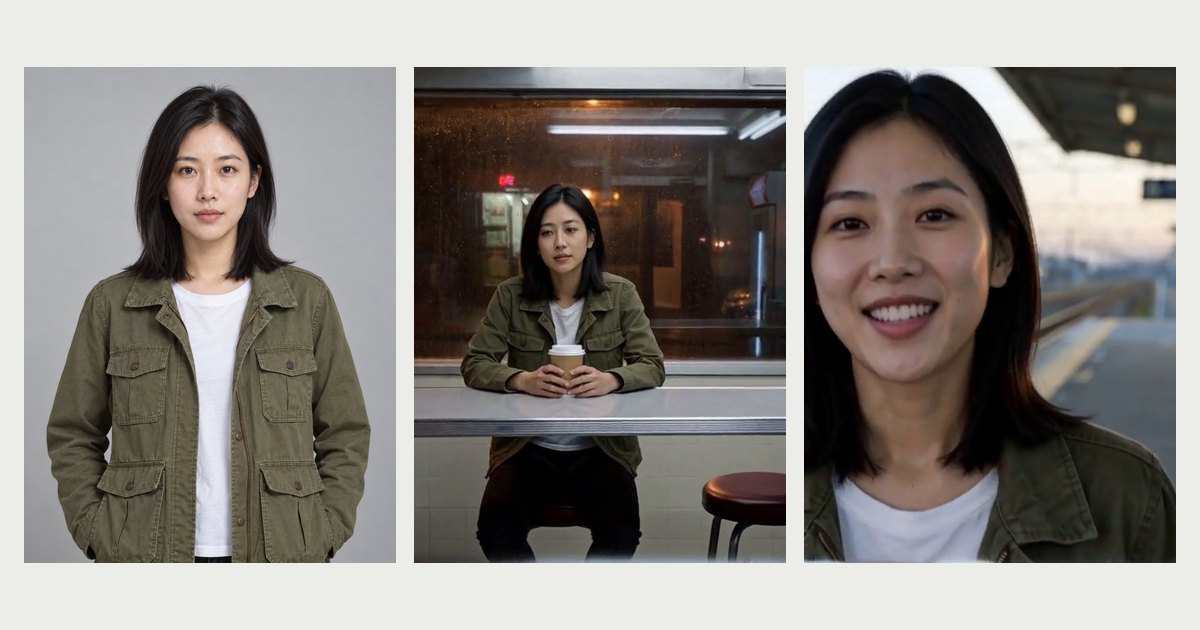
I uploaded a reference image. Why does my MiniMax H3 character still change?
Short answer: attach the same reference picture to every clip, bind it to a label (<Subject 1> is the woman in <Picture 1>), say once in retention_analysis what to keep, wrap every line in <d>…</d> with a speaker ID, and paste the same voice description into each clip. The steps below show how.
Every clip is a separate render. H3 does not remember episode one when it draws episode two, so a clip’s idea of who is on screen comes from three places, and only three: the reference picture you attach, the labels in your prompt that bind that picture to a character, and the words you write about that character. When a face drifts, one of the three is missing or two of them disagree.
The most common version is easy to miss: the pictures are attached, so the prompt feels finished, but nothing tells the model which picture is which — and the shots then describe the person again in words, which hands the model a second, competing description of someone the picture already shows.
| Where identity comes from | What it carries | When it is missing |
|---|---|---|
| The reference picture | Face, hair, build, outfit | The model invents a new person for every clip |
| The label that binds it (<Subject 1> … <Picture 1>) | Which picture is which character | Faces swap, or two characters blend into one |
| The words about the character | What they do, say and feel in this scene | Words that re-describe the look override the picture, and details change |
Step 1: Cast first — one reference sheet per character
MiniMax’s own short-film workflow starts here, before any video: a character card for each person and a scene card for each location — and the scene cards show the place only, with no people in them (3d-animation-short-generator on GitHub). The reason holds on any model: a picture keeps a face better than a paragraph does.
What makes a good character reference for H3:
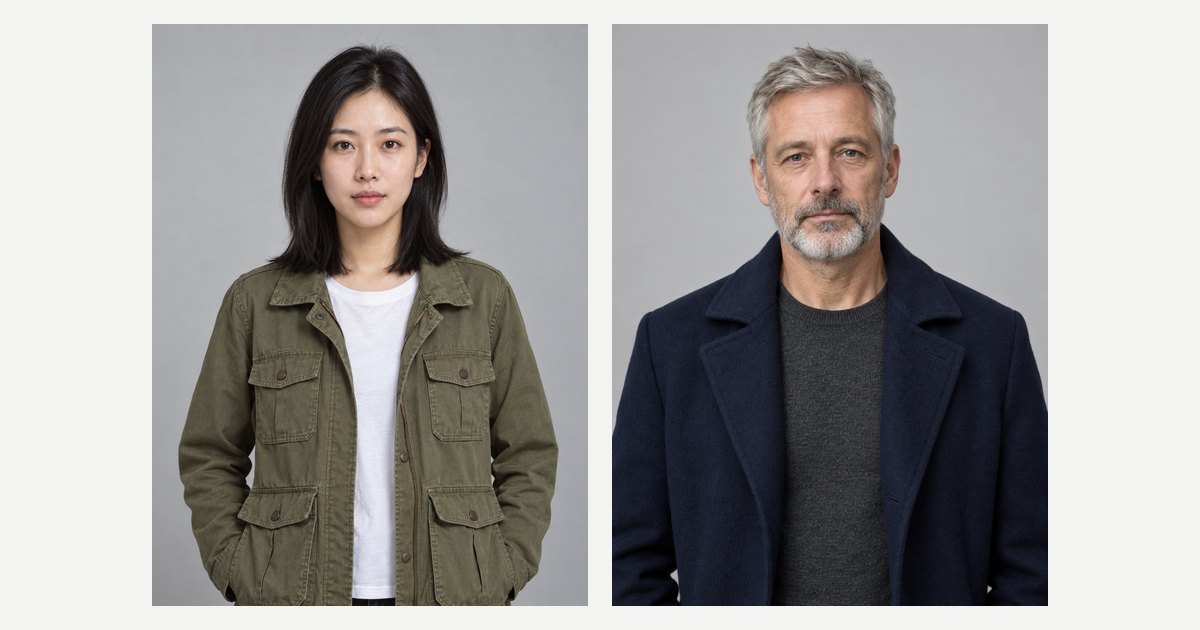
- One character per picture: waist up, facing the camera, plain background, even light — like the two portraits below.
- Keep the face large. On HelloGen’s H3 Unlimited every reference is scaled to the clip’s canvas before the model sees it, so a small face in a wide photo or a busy turnaround sheet arrives as a handful of pixels. Waist up shows the outfit and still gives the face room.
- Put the outfit in the picture, not the prompt. If your lead wears the green jacket in every episode, draw her in the green jacket. A costume change mid-series means a new sheet, not a new sentence.
- Reuse the same file for the whole series. A slightly different picture is a slightly different person.
You can draw the cast with HelloGen’s free image generator, save the pictures, and attach the same files to every clip.
Step 2: Bind each picture to a character with <Subject N>
H3’s reference mode has its own labels, and they are the part most prompts skip. MiniMax’s guide uses <Picture N> for an image itself and <Subject N> for something taken from it — a person, an outfit, a place — that the shots can then point at (h3-prompt-writing on GitHub). A character is a subject:
<Subject 1> is the young woman in <Picture 1>, with shoulder-length black hair and a green field jacket.
From then on every shot says “<Subject 1>”, never “she” or “the girl”: one label, one meaning, in every section of the prompt. Keep the identifying phrase short and reuse the exact words — MiniMax’s own examples repeat “the young man in the dark-grey hoodie” shot after shot instead of finding a synonym. On HelloGen you do not type the picture’s brackets yourself: type @ in the video composer, pick the image, and @Image1 reaches H3 as <Picture 1>.
| Label | Use it for | Example |
|---|---|---|
| <Subject N> | A character, outfit, prop or place taken from a reference | <Subject 2> is the man in <Picture 2>, short grey beard, navy wool coat. |
| <Picture N> | An image used as an actual frame — the first frame of a shot | <Picture 3> is the first frame of [Shot 1]. |
| (S1), (S2) | Who is speaking: a voice, not a picture | <Subject 1> (S1) says: <d>[English] You came back.</d> |
Step 3: Say what must survive — then stop describing it
The third section of an H3 reference prompt, retention_analysis, is where you say what to keep and in which shots each character appears. MiniMax gives it fixed values — fully_preserved, partially_preserved, attribute_transfer, weak_reference:
<Subject 1> (appears in [Shot 1], [Shot 3]): fully_preserved - her face, shoulder-length black hair and green field jacket are retained.
This is also where most of the drift we have debugged came from — not too little description, but description in the wrong place. On our own H3 runs, when a prompt skipped this section and described the subject again inside the shots, the words beat the picture in every run we checked: a cup grew a handle it does not have, another product came back silver because the text said silver eight times, a third lost its logo. People drift the same way. So name the features once, here, and let the picture carry them. In the shots, write what the character does, not what they look like.
Three more rules from our own productions:
- Keep the person, not the picture. Add “do not reuse the reference’s background”. On one of our H3 runs, a white-background reference was pasted into the final second whole, like a sign.
- Never script a change to the person mid-clip. “Her hair comes loose” is a transition the model cannot draw: it flickers between the two states and the face starts to look like someone else. If the hair is down, it is down from the first frame.
- Write only what would be true of any photo you attach. Age, build, skin and hairstyle belong to the reference. Wet hair, a torn sleeve, mud on the boots belong to the scene — those you can write.
Step 4: Keep one consistent voice — an ID per speaker, the same description every time
A short drama is half dialogue, and H3 speaks: picture and stereo sound come out of the same pass. Two things decide whether the right character says the right words in a voice you recognise.
Markers and IDs. Each spoken line goes inside <d> and </d> with a language tag, and each speaking character gets a fixed ID — (S1), (S2) — before the line: <Subject 1> (S1) says: <d>[English] You said you’d call.</d> A line written as prose is the most common cause of speech-shaped noise; our guide to H3 gibberish has the measurement and seven fixes.
The same voice across episodes. A speaker ID lives inside one clip only. H3 has no memory of the last render, so (S1) in episode two is a new voice unless you describe it the same way. Write one voice description per character — age, pitch, timbre, pace, accent — place it before “says:” the first time they speak in a clip, and paste it word for word into every clip:
<Subject 1>, a woman in her late twenties with a low, slightly husky voice and an unhurried pace (S1), says: <d>[English] …</d>
On the credit-priced MiniMax H3 you can also attach a 2–15 second voice clip and declare <Audio 1> is the voice-timbre reference for <Subject 1> (S1), which MiniMax’s guide supports. H3 Unlimited takes images only, so there the written voice description is the anchor: keep it identical. A description steers H3 toward the same kind of speaker; expect a close match rather than a cloned recording.
Step 5: Write the scene shot by shot
H3 can cut inside one clip. In MiniMax’s format the first shot is [Shot 1] with no time, and every later shot opens with its cut time: [Shot 2] At 00:05.000, the shot cuts to… A cut should bring something new — a face, a place, a change of state; if only the distance changes, move the camera instead. The rules that keep a two-hander readable:
| Rule | Why |
|---|---|
| One speaker per shot, facing the camera, mouth visible | Lip-sync holds on a visible face. A line over a turned head or a wide shot drifts, or lands on the wrong person. |
| Act first, then speak | “She sets the cup down, then says…” — a line during a sip or a hug hides the mouth. |
| No more than three characters with action or lines in a shot | MiniMax’s own short-film checklist caps it there. |
| Positions from the camera: “frame left”, “enters frame right” | “To her left” is ambiguous; the camera’s view is not. |
| Give heights when two people share a frame: in numbers, or at least as a relation | “182 cm and 160 cm” or “a head taller” — with neither, the model tends to even them out. |
| A line every 3–4 seconds, or say which seconds are silent | A short line in a long clip invites filler talk you never wrote. |
| Directions before “says:”, never right after </d> | Text written straight after the closing marker gets spoken aloud. |
Step 6: Carry the story from one clip to the next
H3 renders 4 to 15 seconds at a time, so an episode is several clips joined in an editor. Whether the joins show is decided before you render:
- End every clip on a named state — “ends with <Subject 1> holding the letter, the door open behind her” — and open the next clip on exactly that state.
- Pin every change that happens once. In our own multi-shot productions the most common continuity bug was not the model inventing things but the prompt contradicting itself: a door opened in shot two and again in shot five, a seatbelt released twice. List what changes — the door, the coat, who sits where — and write how many times and when: “the door opens exactly once, in [Shot 2], and stays open”.
- Same set, same words. Describe each location once, paste it unchanged into every clip that uses it, and say what is not there — “no other people, no signage”. Invented background is a common source of drift between shots.
- Hand over the last frame. Export the final frame of one clip and start the next from it: H3 Unlimited has a first-frame mode and a first-and-last-frame mode for exactly this. In reference mode, MiniMax’s guide also lets one picture act as a frame (“<Picture 3> is the first frame of [Shot 1]”) while the others define the characters.
For a line that runs across a cut, MiniMax writes <scenetrans> at the point where the line breaks off and again where it picks up in the next shot, and states that the audio continues across the cut; <cutoff> marks speech the end of the clip interrupts.
A complete 15-second scene to copy
Two references attached: the woman’s portrait first, the man’s second. In HelloGen’s composer they are @Image1 and @Image2, which reach H3 as <Picture 1> and <Picture 2>. Three shots, two voices, one change of heart. Swap in your own cast, place and lines; keep the structure.
How the prompt below is built: the labels bind the two portraits, retention_analysis holds faces and coats without repeating them in the shots, each shot has one speaker facing the camera, every action comes before its line, and each voice is described once in words you can paste into the next episode unchanged.
subject_definitions: <Subject 1> is the young woman in <Picture 1>, shoulder-length black hair, green field jacket. <Subject 2> is the man in <Picture 2>, short grey beard, navy wool coat. <Subject 3> is a small station café at night: one counter, three stools, rain on the front window.
summary: [reference generation] <Subject 1> has been waiting in <Subject 3>; <Subject 2> arrives late, and she decides to let him stay. Three shots, 15 seconds.
retention_analysis: <Subject 1> (appears in [Shot 1], [Shot 3]): fully_preserved - face, shoulder-length black hair and green field jacket are retained. <Subject 2> (appears in [Shot 2], [Shot 3]): fully_preserved - face, short grey beard and navy wool coat are retained. Do not reuse either reference’s background.
detailed_description: Live-action, naturalistic drama, cool fluorescent light inside, warm street light through the rain-streaked window. [Shot 1] A medium shot from across the counter: <Subject 1> sits on the middle stool facing the camera, both hands around a paper cup. The camera pushes in slowly. She looks up toward the door, and <Subject 1>, a woman in her late twenties with a low, slightly husky voice and an unhurried pace (S1), says: <d>[English] You’re forty minutes late.</d> [Shot 2] At 00:05.000, the shot cuts to the doorway: <Subject 2> steps in from frame right with rain on his shoulders and stops, facing the camera. <Subject 2>, a man in his fifties with a deep, quiet voice (S2), says: <d>[English] The last train was cancelled. I walked.</d> [Shot 3] At 00:10.000, an over-the-shoulder shot from behind <Subject 2>, who stands at frame right, a head taller; <Subject 1> faces the camera from her stool at frame left. She studies him, sets the cup down and slides it toward him, then <Subject 1> (S1) says: <d>[English] Sit down. It’s still warm.</d>
overall_soundscape: Rain on the window, the low hum of a drinks fridge, the door’s bell once at 00:05, wet footsteps, a paper cup sliding on laminate.
non_diegetic_music: N/A
The mistakes we see most, and the fix
A handful of habits cause most broken story clips. Each has a one-line fix.
| What we see | What happens | Fix |
|---|---|---|
| Lines in quotes or prose | Speech-shaped noise, wrong words | Wrap each line: (S1) says: <d>[English] …</d> |
| References attached but never named | The model guesses whose face is whose | Define a <Subject N> for each picture and call it by its label |
| Hair and outfit described in every shot | The words override the picture and details change | State them once in retention_analysis; shots say what the character does |
| “4K, ultra-realistic, cinematic, masterpiece” | Nothing useful — these words direct no camera and no light | Name the light source, the framing and the camera movement |
| Pronouns instead of labels | A second person appears, or lines swap mouths | Use the label every time |
| Subtitles or captions in the prompt | Duplicated, garbled text on screen | Add captions in your editor |
| Beats that do not add up to the clip length | Rushed action, or filler talk at the end | Time every shot; make the total match the 4–15 s you chose |
Let ✦ Enhance write the syntax, and iterate at 0 credits
If labels, markers and section names feel like bookkeeping, that is because they are. In HelloGen’s video composer, write the scene the way you would tell it — who is in it, what they say, how it ends — attach your character sheets and press ✦ Enhance. For MiniMax H3 it rewrites your idea into the reference form above, from the same H3 prompt guide: pictures named and lines inside the markers with speaker IDs. It is built to keep your words as written and not to add lines you did not write; read the result before you render. It costs 2 credits and is charged only when it succeeds.
Then render the scene as many times as it needs. MiniMax H3 Unlimited comes with Pro (from $19.90 a month) and Max at 0 credits per clip, with no daily cap — at least 2 priority clips a day on Pro and 5 on Max, standard speed after that. Pro renders at 480p, and the video upscaler doubles a clip’s resolution for 2 credits per 15 seconds; Max adds unlimited 720p HD. Your plan’s credits also run the hosted MiniMax H3 at native 2K, Veo 3.1, Kling 3.0 and Seedance — worth it for the one hero shot of an episode. For ad-style scenes, the companion guide covers UGC product ads on H3.
Sources
- MiniMax-H3 h3-prompt-writing skill on GitHub — the six reference-mode sections, <Subject N> / <Picture N> / <Audio N> labels, retention values, speaker IDs, <scenetrans> and <cutoff>.
- MiniMax-H3 3d-animation-short-generator skill on GitHub — character and scene cards before video, at most three important characters per shot.
- The clips on this page — rendered on HelloGen’s MiniMax H3 Unlimited at 720p, October 2026; the café scene’s prompt is printed in full above.
- HelloGen’s own H3 runs, September 2026 — words against the picture, a reused background, text after </d>, short lines inviting filler, on-screen text.
- Related: Why MiniMax H3 speaks gibberish, and how to fix it and AI UGC video prompts for MiniMax H3.
Frequently asked
How do I keep the same character across MiniMax H3 clips?
Attach the same reference sheet to every clip, define it once as <Subject 1> is the woman in <Picture 1> with a short identifying phrase, mark it fully_preserved in retention_analysis, and call it by its label in every shot. Do not describe hair or clothes again in the shots: the words compete with the picture.
How many reference images can MiniMax H3 use?
Up to nine images in reference mode, which is MiniMax’s number and also what HelloGen’s H3 Unlimited accepts (five when you render at 720p). More pictures is not automatically better: send the ones your shots actually name, one character or place per picture.
How do I keep a character’s voice the same in every episode?
A speaker ID such as (S1) only lasts one clip. Write one voice description per character — age, pitch, timbre, pace, accent — and paste it word for word before “says:” in every clip. On the credit-priced MiniMax H3 you can also attach a 2–15 second voice clip as <Audio 1>.
What is the difference between <Subject N> and <Picture N> in MiniMax H3?
<Picture N> is the uploaded image itself, used directly when it is a frame such as the first frame of a shot. <Subject N> is something taken from a picture — a person, an outfit, a place — that the shots refer to. Characters are subjects: <Subject 2> is the man in <Picture 2>.
Can MiniMax H3 make a scene longer than 15 seconds?
One clip runs 4 to 15 seconds. For a longer scene, end each clip on a named state, start the next clip from the last frame of the previous one, keep characters and set described in identical words, and join the clips in an editor.
Why does my MiniMax H3 character speak gibberish?
Usually because the line is written as prose or in plain quotes. Put it inside H3’s dialogue markers with a speaker ID and a language tag — (S1) says: <d>[English] the line.</d> — and keep stage directions before “says:”, never right after </d>.