
Storyboard to video AIFrom a script or your panels to a finished film, shot by shot.
Storyboard to video AI turns a list of shots into video clips and joins them into one film. HelloGen’s Storyboard starts from your script, or from panels you already drew: each shot renders on the model you pick, and your best takes are cut into one film.
- Up to 50 shots
- 2–30 s a shot
- 8 credits to write the storyboard
- MiniMax H3 Unlimited: 0 credits a shot on Pro and Max
INT. CORNER CAFÉ – MORNING
Mia, 23, walks in and waves at her phone.
MIAI walked past this place for a year. Big mistake.
The phone turns: steam, milk, the pastry case.
MIA (V.O.)Everything here is made about a metre from where you stand.
The first sip at the counter. Eyes closed, a nod.
MIAOh, that is so much smoother than I expected.
MIATen out of ten. Go before the queue finds it.
Script to video AI, in four steps
Every shot is footage generated for your script on the model you pick, not stock clips under a voiceover.
- 1
Paste your script
A short drama, a product ad, a story video. Or write it in place.
- 2
Generate the storyboard
AI breaks the script into shots, one row each: what happens, how long it runs, which model renders it, and a prompt in that model’s own format. Change any row by typing in it.
- 3
Render shot by shot
Each row is one generation on its own model. Render a few takes, keep the best as the final, and redo only the shot you don’t like.
- 4
Cut in one click
The finals are joined in storyboard order, each with its own sound, and the film is saved to My Works.
Turn your storyboard panels into video
Already drew the boards? AI storyboard to video works from your panels too.
- Add one shot for each panel.
- Set the panel as the shot’s first frame, or use two panels as its first and last frames.
- Describe the movement and render. Cut the shots together when they are done.
Keep the same character in every shot
A video model remembers nothing between clips. What carries a face, an outfit or a room from one shot to the next is the picture you give it. Storyboard pulls the characters, locations and props out of your script as assets (2 credits). Upload a photo for each, or let AI draw a 2K reference sheet (15 credits). Tag them with @ in a shot, and the same picture goes to the model in every shot that names them.
 @Mia
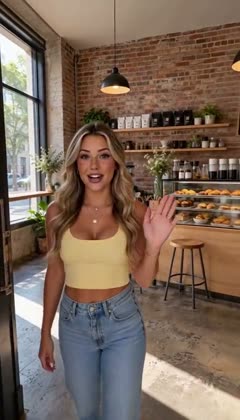 Shot 1
 Shot 5
 Shot 6
Pick a model for each shot
Every shot can use a different model. The list is the AI Video Generator’s own, at the same prices.
| Model | Shot length | How you pay |
|---|---|---|
| MiniMax H3 Unlimited | 4–15 s · 480p on Pro, 720p HD on Max | 0 credits a shot on Pro and Max |
| Seedance 2.5 | 4–30 s | Credits per second |
| Kling 3.0 | 3–15 s · up to 4K | Credits per second |
| Veo 3.1 | 4, 6 or 8 s | Credits per clip |
| Wan 3.0 | 2–30 s | Credits per second |
A shot that fails is refunded automatically. Refund Policy
Long AI video generator: one clip or a storyboard?
None of the models on HelloGen renders more than 30 seconds in one go (November 2026): Seedance 2.5 and Wan 3.0 reach 30, most stop at 15. Long-form AI video is made shot by shot and cut together, the way films are.
| One long clip | A storyboard | |
|---|---|---|
| Longest video | 30 seconds | Up to 50 shots: 12½ minutes at 15 s a shot |
| Same character throughout | Holds inside the clip | Holds when every shot gets the same reference picture |
| A moment you don’t like | Render the whole clip again | Render that one shot again |
| Framing | One camera move | Each shot gets its own |
What a storyboard video costs
- Writing the storyboard: 8 credits. Pulling the assets out of the script: 2.
- Each shot: that model’s usual price. On Pro ($19.90 a month) and Max ($49.90), MiniMax H3 Unlimited shots cost 0 credits. Line up 3 at a time on Pro and 5 on Max: each starts when the one before it finishes, in the standard queue, and you can close the page while they render.
- Cutting the film: 2 credits per started minute.
Pro also includes 3,600 credits a month and Max 10,000, for shots on Seedance 2.5, Kling 3.0, Veo 3.1 and Wan 3.0. What the unlimited plan includes →
What our own test films taught us
We built Storyboard after making short dramas and product ads shot by shot ourselves. Three things shaped it.
Shots often needed more than one take.
So every row keeps its takes side by side for you to pick the final, and unlimited shots on MiniMax H3 suit this way of working.
Two renders never match exactly.
In our tests, cutting from a medium shot of someone to another medium shot of them made the small differences jump out; cutting to a close-up or a wide shot hid them. Check this first when you edit the rows.
The picture decides the face.
Described in words alone, a character’s face drifted from shot to shot in our tests. The same reference picture, tagged in every shot, held it.
Storyboard to video AI, answered
What is storyboard to video AI?
A tool that turns a storyboard, a list of shots, into video clips and joins them into one film. On HelloGen it starts from your script: AI writes the storyboard, each row renders on the video model you choose, and one click cuts the film.
Can I turn my own storyboard panels into a video?
Yes. Add one shot per panel, set the panel as the shot’s first frame (or two panels as its first and last frames), describe the movement and render. Cut the shots together when they are done.
How long can a storyboard video be?
Up to 50 shots in one storyboard, each 2 to 30 seconds depending on the model. Ten 6-second shots make a one-minute film; 50 shots of 15 seconds run 12½ minutes.
How do I keep a character consistent from shot to shot?
Give the character a picture: upload a photo or let AI draw a reference sheet, then tag it with @ in every shot it appears in. The same picture goes to the model each time.
Which AI video models can I use?
Seedance 2.5, Kling 3.0, Veo 3.1, Wan 3.0, MiniMax H3 and MiniMax H3 Unlimited: the AI Video Generator’s own list. Each shot can use a different model.
How much does it cost? Is any of it unlimited?
Writing the storyboard costs 8 credits and cutting 2 credits per started minute; each shot costs that model’s usual price. On Pro and Max, shots on MiniMax H3 Unlimited cost 0 credits with no daily cap; they wait their turn in the standard queue.
Do I have to keep the page open while shots render?
No. Rendering and the H3 queue run on our side. Close the tab and come back: finished takes are on their rows, and every clip is also saved in My Works.
Can I change one shot after it renders?
Yes. Edit that row and render again. The earlier takes stay so you can compare, and nothing else in the film is rendered again.
Updated 14 November 2026 · Tested by the HelloGen team
Turn your script into a film
Up to 50 shots, the model you choose for each, cut in one click.
Paste your script