
GPT Image 2.6 GIF Generator: Turn a Photo or a Prompt into an Animated GIF
 Chywe, Head of Product at HelloGen
OpenAI released GPT Image 2.6 on November 4, 2026; in ChatGPT it is called ChatGPT Images 2.6. Its headline feature is the animated GIF: upload a photo and make it move, or describe a motion in one sentence, and about twenty seconds later you have a looping GIF. It is the same model behind GIFs in ChatGPT, and HelloGen already offers it, so photo to GIF and text to GIF both work today.
✦ Make a GIF with GPT Image 2.6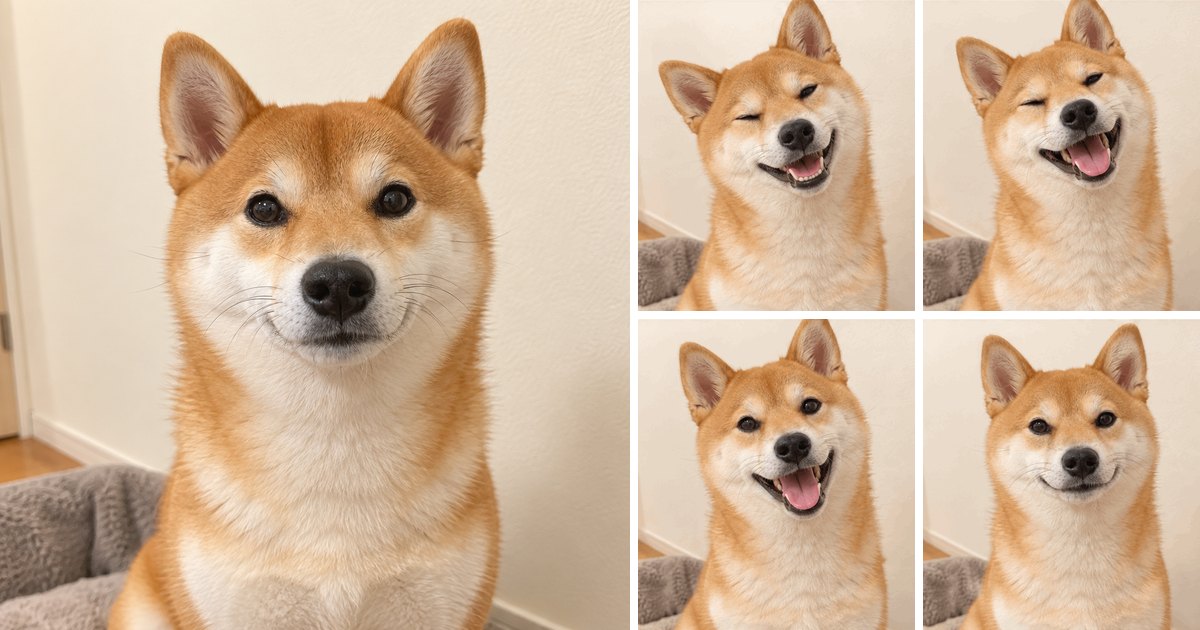
The short answer
GPT Image 2.6 turns a single photo or a single sentence into a looping GIF, and the subject of the photo stays consistent in every frame. Measured on November 6, 2026 (one run each, so expect some variation): a Shiba Inu photo became a 9-frame reaction GIF in 20.8 seconds, and a one-sentence prompt became a 9-frame GIF in about 25 seconds.
What is GPT Image 2.6?
GPT Image 2.6 is OpenAI’s newest image model. It outputs animated GIFs directly, from text or from a photo. OpenAI says it generates images about 50% faster than GPT Image 2.5 (OpenAI announcement).
GPT Image 2.6 in the HelloGen image generator runs on the Flare version, and its GIFs come from the same model. OpenAI’s developer API offers two versions:
| Version | What it is | Best for |
|---|---|---|
| Flare | Fast; OpenAI says as little as 6 seconds per image | Everyday images, posters, product shots |
| Sunburst | More detail, steadier across repeated edits | Polished work, images you edit many times |
Photo to GIF: animate a photo with GPT Image 2.6
Looking for an AI tool that turns an image into a GIF? GPT Image 2.6 does it: upload a photo, write one sentence about how it should move, and it draws a set of frames based on that photo and loops them into a GIF. The subject keeps its look in every frame; only the motion you asked for changes.
OpenAI’s own image generation guide says the same thing: to animate a still picture, send it to the image edit endpoint (OpenAI image generation guide). HelloGen has already wired that up, so all you do is upload the photo.
Our test: a Shiba Inu photo turned into a reaction GIF
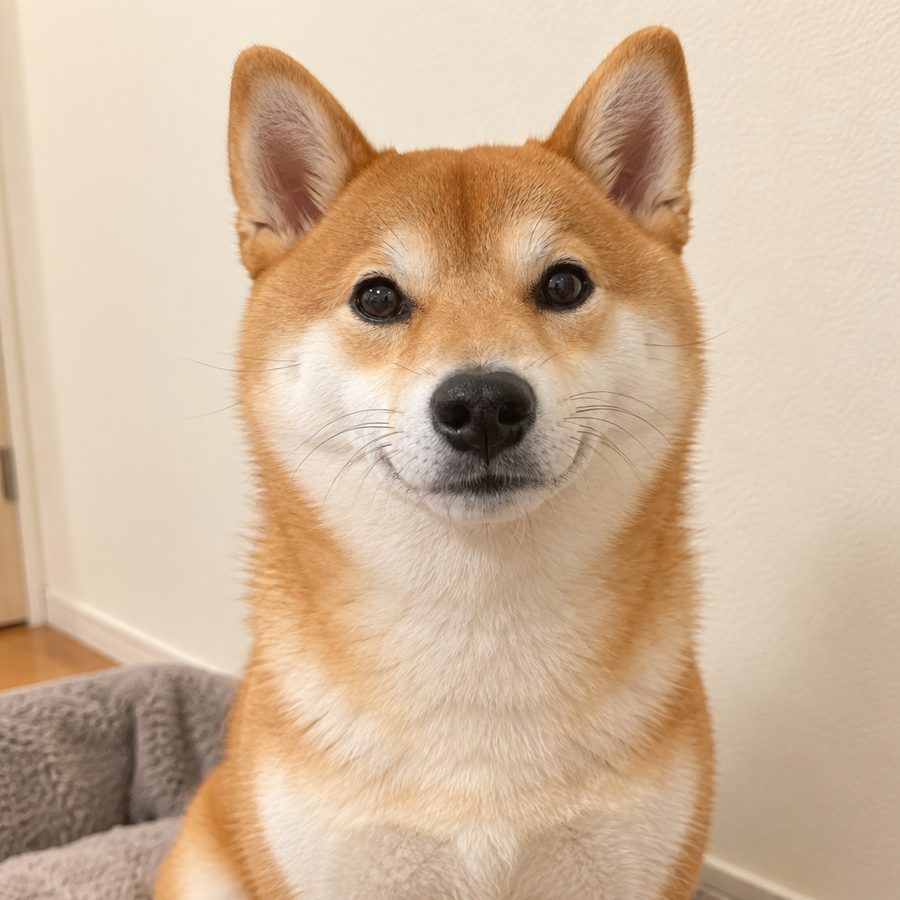
We made the Shiba Inu photo with GPT Image 2.6 first, then turned it into a GIF. Across nine frames the dog tilts its head, winks, breaks into a grin and settles back to where it started; its fur, ears and background stay the same throughout. The GIF took 20.8 seconds and cost 30 credits.
Turn this photo into a cute reaction GIF: the dog tilts its head, gives a playful wink and a big happy smile, then returns to the starting pose for a seamless loop. Keep the dog, its fur, the lighting and the background exactly as in the photo.
How to turn a picture into a GIF, step by step
- Open the HelloGen image generator and pick GPT Image 2.6.
- Tap “+” and upload a photo, up to two (a portrait and a background, for example).
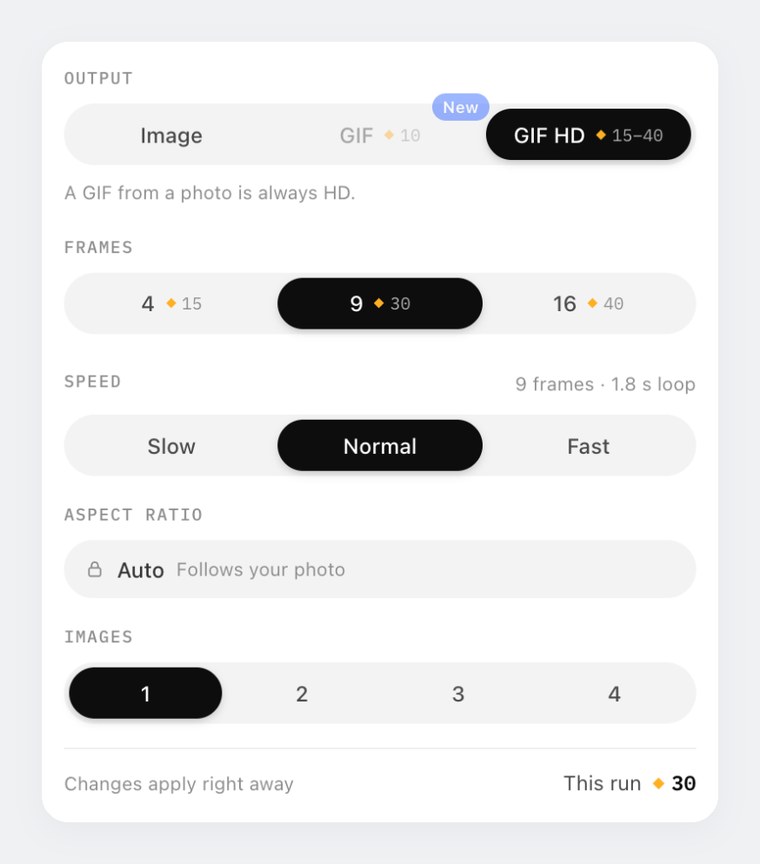
- Open Settings and set Output to GIF HD. Once a photo is attached this is selected for you.
- Describe the motion in one sentence: what moves, how, and what stays the same. Then choose 4, 9 or 16 frames and a speed.
- Hit Generate and download the GIF when it is ready.
Which photos animate best
Photos with a single clear subject work best. Each kind of photo suits a different motion:
| Photo | Motions that work | What to say in the prompt |
|---|---|---|
| Pet photo | Head tilt, wink, tail wag | One motion only; keep the background still |
| Portrait or selfie | Blink, smile, small nod | “Keep the face and hair exactly the same” |
| Product shot | A light sweep, rising steam, a slow turn | “Keep the product’s shape and label” |
| Illustration or character | Wave, small hop, change of expression | Flat colours give the cleanest result |
| Landscape | Rippling water, drifting clouds | Slow speed, 9 or 16 frames |
What a photo GIF costs
- Always HD, priced by frame count: 15, 30 or 40 credits for 4, 9 or 16 frames.
- The aspect ratio follows the photo: a portrait photo gives a portrait GIF, a landscape photo a landscape one.
- Up to two photos are used; any more are ignored.
- Cut-outs with a transparent background work too, a logo for example; the transparent areas are treated as white.
Text to GIF
No photo? No problem. Write one sentence in HelloGen’s AI GIF generator and GPT Image 2.6 draws the frames itself. Text to GIF comes in two tiers: GIF at 10 credits (any frame count) and GIF HD at 15 to 40 credits (by frame count).
Both GIFs below come from the same prompt. Standard frames are 414 pixels, HD frames 512, and the character holds steady across all nine frames in both. For stickers, reactions and simple logo loops the standard tier is plenty; pick HD when you want every frame sharper.
A cute round teal robot mascot waving hello and blinking, flat illustration, plain light background, seamless loop that returns to the starting pose.
What to make with GIFs
A GIF plays almost anywhere without a video player: iMessage, WhatsApp, Slack, Discord, email and most websites. That makes it ideal for short animations of a few seconds:
| Use | How | Suggested settings |
|---|---|---|
| Reaction GIFs and stickers | From text: one character, one expression | GIF · 4 frames · fast |
| An animated profile picture | Upload your avatar and make it blink or smile | GIF HD · 4 frames · normal |
| Product GIFs for a shop or social | Upload a product shot; add a light sweep, steam or a slow turn | GIF HD · 9 frames · normal |
| Animated logo | Upload a cut-out logo and light the letters one by one | GIF HD · 9 frames · slow |
| Greeting cards and invitations | From text: a scene and one small motion, like falling snow or fireworks | GIF · 9 frames · normal |
Frames, speed and prompt tips
One loop lasts frames × time per frame. HelloGen offers 4, 9 or 16 frames at three speeds: slow (300 ms per frame), normal (200 ms) and fast (100 ms).
Four frames suit pictures where detail matters, like products and portraits; nine suits most motions; sixteen suits continuous motion such as a full turn or rippling water. All frames share one size budget, so more frames means smaller frames.
- Ask for one motion. “Waves” is far steadier than “waves, turns around and jumps”.
- Ask it to end where it started. Add “return to the starting pose” and the loop has no visible seam.
- Say what stays still. For a photo GIF, write “keep the face, clothes and background the same”.
- Flat styles shine. Stickers, illustrations and logos make the cleanest GIFs.
| Frames | Slow | Normal | Fast |
|---|---|---|---|
| 4 frames | 1.2 s | 0.8 s | 0.4 s |
| 9 frames | 2.7 s | 1.8 s | 0.9 s |
| 16 frames | 4.8 s | 3.2 s | 1.6 s |
GPT Image 2.6 for still images
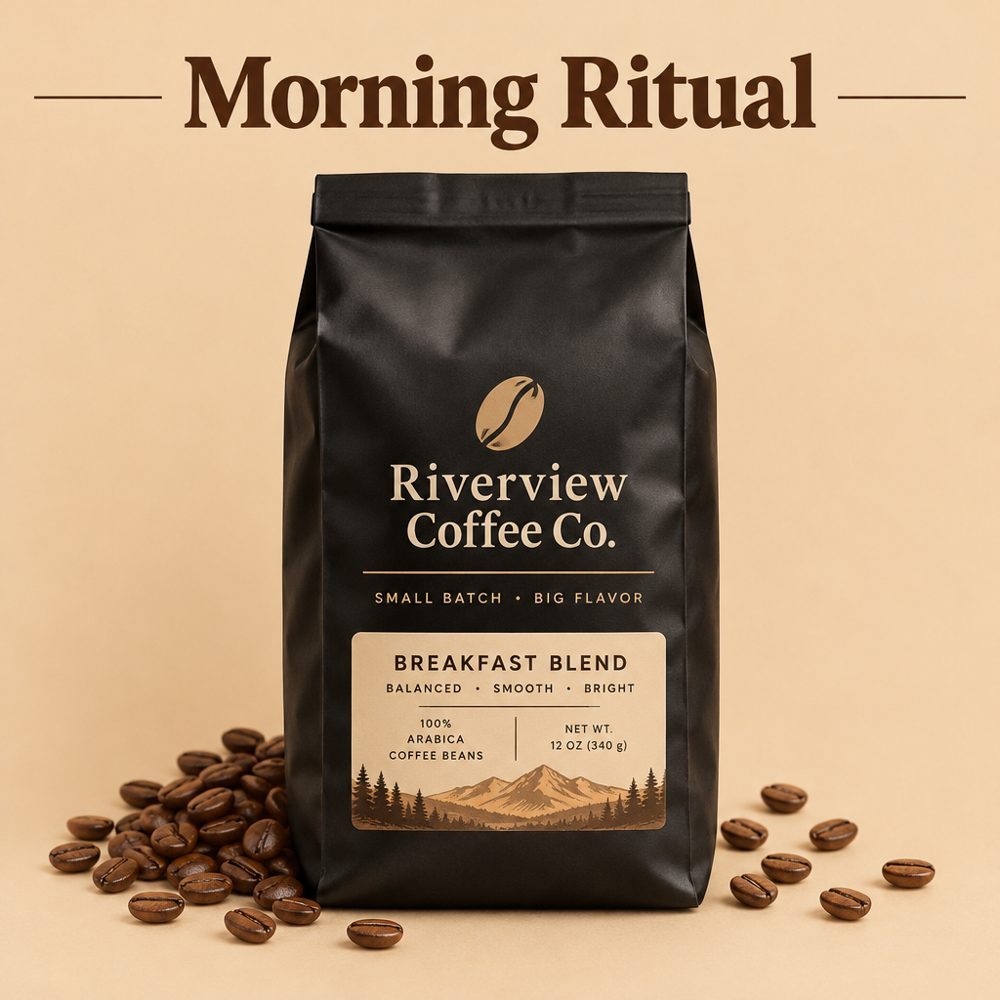
Without the GIF switch, GPT Image 2.6 renders text and layouts cleanly. Both pictures below were made the same day: one from a single prompt, one from two reference images (a headphone product shot and the KOVO logo) combined into an ad.

How much does a GPT Image 2.6 GIF cost?
A failed generation costs nothing. Credit packs and plans are on the HelloGen pricing page.
In ChatGPT, GIFs come with the subscription plans (as of November 6, 2026; see ChatGPT pricing). If you would rather pay per GIF, or want Nano Banana Pro, Seedream 4.5 and video models in the same account, HelloGen is the easier fit.
| What you make | Credits |
|---|---|
| GIF (from text, any frame count) | 10 |
| GIF HD, 4 / 9 / 16 frames (from text) | 15 / 30 / 40 |
| Photo to GIF, 4 / 9 / 16 frames | 15 / 30 / 40 |
| Still image: 1K / with references / 2K | 16 / 24 / 50 |
GPT Image 2.6 vs 2.5 vs GPT Image 2
GPT Image 2.6 is the only one of the three that makes GIFs, from text and from photos. On HelloGen, GPT Image 2 has been upgraded to 2.6, and 2.5 is still there for still images when you want to spend fewer credits.
| GPT Image 2 | GPT Image 2.5 | GPT Image 2.6 | |
|---|---|---|---|
| Released | 2026-04-21 | 2026-09-08 | 2026-11-04 |
| GIF from text | — | — | |
| GIF from a photo | — | — | |
| Speed (per OpenAI) | Baseline | Faster than 2 | About 50% faster than 2.5 |
| On HelloGen | Upgraded to 2.6 | 1K for 8 credits | 1K for 16 credits, GIFs from 10 |
Need a longer animation?
A GIF holds up to 16 frames, which is perfect for a blink, a wave or a sparkle lasting a few seconds. For longer, smoother footage with sound, turn the same photo into a video with the HelloGen AI video generator; Pro and Max members also get unlimited AI video. For better video prompts, see our MiniMax H3 prompt guide for short dramas.
How we tested
On November 6, 2026 we made every picture and GIF on this page on HelloGen, the same way any user would: text-to-GIF and still images on GPT Image 2.6 Flare, photo-to-GIF through OpenAI’s image edit endpoint. Times run from pressing Generate to receiving the file, one run each. The Shiba Inu photo itself was generated with GPT Image 2.6; nothing on the page comes from another site.
Sources
- Images, upgraded: introducing ChatGPT Images 2.6: OpenAI Developer Community, 2026-11-04
- GPT-Image-2.6 Flare model documentation: OpenAI
- Image generation guide (GIF output): OpenAI
- ChatGPT can now turn text prompts and photos into animated GIFs: The Decoder
- ChatGPT pricing: OpenAI
Frequently asked
Can GPT Image 2.6 turn a photo into a GIF?
Yes. Upload a photo and describe a motion, and you get a looping GIF that keeps the subject and scene of the original. On HelloGen it starts at 15 credits for 4 frames.
How do I turn a picture into a GIF with AI?
On HelloGen, pick GPT Image 2.6, upload the picture, set Output to GIF HD, describe the motion in one sentence and generate. In our test a Shiba Inu photo became a 9-frame GIF in 20.8 seconds.
Can ChatGPT make a GIF from a photo?
Yes. Since Images 2.6, ChatGPT can make GIFs from text or from a photo. HelloGen runs the same model.
What is the difference between GIF and GIF HD?
GIF costs 10 credits and works from text only. GIF HD has sharper frames, costs 15 to 40 credits by frame count, and works from text or a photo.
How do I make a GIF from a photo on my phone?
Open HelloGen in your phone’s browser and follow the same steps as on a computer: pick GPT Image 2.6, upload a photo from your gallery, choose GIF HD in Settings, then save the GIF when it is done.